
library(tlfstack)
out <- tempfile("tlfstack-")
dir.create(out)
tlfstack separates clinical reporting into three seams:
- Builders turn analysis data into a table object or a ggplot.
- Title resolution turns metadata into a title block.
- Renderers turn both into submission-style RTF under one set of conventions.
Because builders are pure functions, a batch program and an interactive app can share all three seams.
1. Conventions as configuration
cfg <- tlf_config(header_left = "Example Organization")
cfg
#> <tlf_config>
#>   page    : landscape 11x8.5 in, margins 0.5/0.5/0.5/0.5/0.5/0.5; figure body 9x6 in
#>   text    : Courier New 9 (source 8)
#>   figure  : Arial 10 (allowed 9-10)
#>   header  : left='Example Organization' right='Page \pagenumber of \pagefield'
#>   render  : isolate=TRUE retries=2 timeout=90s dpi=300
An organization usually sets this once per session, for example from
a site profile: options(tlfstack.config = cfg).
Alternatively, point the TLFSTACK_CONFIG environment
variable at a YAML file. Every renderer and builder resolves its
configuration through tlf_get_config().
2. Builders: data in, object out
demo <- tbl_demographics(ex_adsl)
demo
#> <tlf_table> 13 row(s) x 6 column(s)
#>  Characteristic Statistic                 Drug 10 mg (N=20) Drug 20 mg (N=20)
#>  Age (years)    n                         20                20
#>                 Mean (SD)                 58.2 (8.4)        59.6 (9.5)
#>                 Median (Q1, Q3)           58.0 (53.0, 64.5) 57.0 (54.0, 64.0)
#>                 Min, Max                  41.0, 72.0        48.0, 88.0
#>  Sex            F                         12 (60.0%)        13 (65.0%)
#>                 M                         8 (40.0%)         7 (35.0%)
#>  Race           ASIAN                     6 (30.0%)         4 (20.0%)
#>                 BLACK OR AFRICAN AMERICAN 3 (15.0%)         5 (25.0%)
#>                 WHITE                     11 (55.0%)        11 (55.0%)
#>  Ethnicity      HISPANIC OR LATINO        3 (15.0%)         2 (10.0%)
#>                 NOT HISPANIC OR LATINO    17 (85.0%)        18 (90.0%)
#>  Age group      <65                       15 (75.0%)        16 (80.0%)
#>                 >=65                      5 (25.0%)         4 (20.0%)
#>  Placebo (N=20)    Total (N=60)
#>  20                60
#>  54.4 (10.8)       57.4 (9.7)
#>  54.0 (46.0, 59.5) 56.5 (51.5, 63.5)
#>  31.0, 77.0        31.0, 88.0
#>  13 (65.0%)        38 (63.3%)
#>  7 (35.0%)         22 (36.7%)
#>  4 (20.0%)         14 (23.3%)
#>  4 (20.0%)         12 (20.0%)
#>  12 (60.0%)        34 (56.7%)
#>  8 (40.0%)         13 (21.7%)
#>  12 (60.0%)        47 (78.3%)
#>  17 (85.0%)        48 (80.0%)
#>  3 (15.0%)         12 (20.0%)
The dispatcher routes a typed request to the right builder, which is how an app offers a menu of outputs:
tlf_table_types()[, c("type", "class")]
#>           type   class
#> 1 demographics   Table
#> 2  disposition   Table
#> 3           ae   Table
#> 4  ae_severity   Table
#> 5          eff   Table
#> 6        shift   Table
#> 7          tte   Table
#> 8   listing_ae Listing
#> 9  listing_lab Listing
ae <- tlf_build_table("ae", list(adae = ex_adae, adsl = ex_adsl))
Figures work the same way:
alt <- ex_adlb[ex_adlb$PARAMCD == "ALT", ]
tlf_build_figure("meanci", alt, opts = list(show_n = TRUE))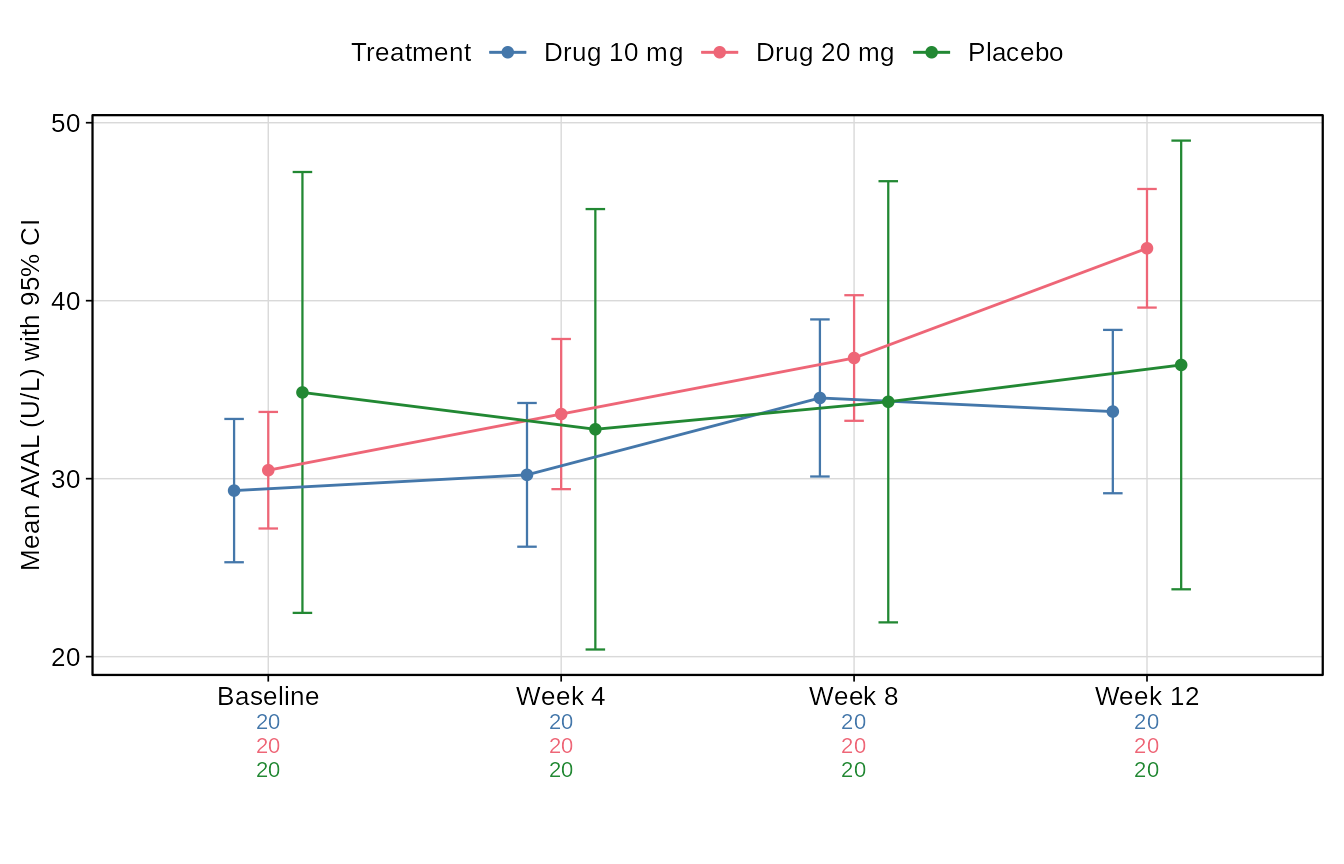
3. Titles from a table of contents
Titles, footnotes and output file names come from a TOC. Sources are tried in order. A reachable live source is authoritative; if no source can be read, the result is a TODO placeholder plus a warning, so a dry run is never blocked.
toc_file <- file.path(out, "toc_snapshot.yml")
toc_write(ex_toc, toc_file, source = "vignette example")
titles <- tlf_resolve_titles(
  "t_demo",
  sources = list(toc_source_dir(out)),
  scope = list(study = "STUDY01"),
  source = "Program: t_demo.R"
)
titles
#> <tlf_titles> mode: snapshot
#>   banner:   Table 14.1.1
#>   title:    Summary of Demographic and Baseline Characteristics
#>   subtitle: Safety Population
#>   footnote: Percentages are based on the number of subjects in each column.
#>   source:   Program: t_demo.R
#>   file:     t-14-01-01-demog.rtf
titles$provenance$mode
#> [1] "snapshot"
In production the first source would be the live database, read through a connector you own. tlfstack never reads credentials:
connect <- function() DBI::dbConnect(odbc::odbc(), dsn = "toc")
sources <- list(toc_source_db(connect, DBI::Id(schema = "dbo", table = "toc")),
                toc_source_dir("metadata"))
A program that produces several outputs selects its row with
number, and {placeholders} in the metadata are
filled explicitly:
tlf_resolve_titles("t_eff", sources = toc_source_dir(out), scope = list(study = "STUDY01"),
                   number = "14.2.1", vars = list(param = "Alanine Aminotransferase"))$title
#> [1] "Summary of Alanine Aminotransferase" "Change from Baseline by Visit"
4. Rendering
f <- file.path(out, titles$output_file_name)
tlf_rtf_table(demo, f, titles = titles)
file.exists(f)
#> [1] TRUE
Text is written verbatim: t_demo.R stays
t_demo.R, braces and backslashes are escaped, and non-ASCII
characters are written as RTF Unicode.
Figures render by default in an isolated child process with bounded retries. A native crash in the graphics stack then becomes a retriable error instead of killing the session:
p <- tlf_build_figure("km", ex_adtte)
tlf_rtf_figure(p, file.path(out, "f-km.rtf"),
               titles = tlf_titles("Kaplan-Meier Estimate of PFS", type = "Figure", number = "14.2.4"),
               render = tlf_render_opts(log_file = file.path(out, "render-log.csv")))
5. gtsummary and Analysis Results Data
The table body can come from gtsummary or from cards ARD. tlfstack then adds the same page conventions, TOC titles and RTF rendering:
body <- gtsummary::tbl_summary(ex_adsl, by = TRT01A, include = c(AGE, SEX))
tb <- as_tlf_table(body)
tb$footnotes
#> [1] "Median (Q1, Q3); n (%)"
tlf_rtf_table(body, file.path(out, "t-demog-gtsummary.rtf"), titles = titles)
The Analysis Results Data behind the table can be exported, one row per statistic, for numeric comparison with an independent SAS result:
ard_file <- file.path(out, "t-demog-ard.csv")
tlf_write_ard(body, ard_file)
head(read.csv(ard_file)[, c("component", "variable", "group1_level", "stat_name", "stat")])
#>     component variable group1_level stat_name stat
#> 1 tbl_summary      SEX   Drug 10 mg         n   12
#> 2 tbl_summary      SEX   Drug 10 mg         N   20
#> 3 tbl_summary      SEX   Drug 10 mg         p  0.6
#> 4 tbl_summary      SEX   Drug 10 mg         n    8
#> 5 tbl_summary      SEX   Drug 10 mg         N   20
#> 6 tbl_summary      SEX   Drug 10 mg         p  0.4
6. One code path, two modes
A batch program and a Shiny app differ only at the two ends:
# Batch: read -> build -> resolve -> render to the deliverables folder.
res <- tlf_build_table("demographics", list(adsl = adsl))
tlf_rtf_table(res, file.path(output_dir, titles$output_file_name), titles = titles)

# Shiny: the same build and render, written to the download handler's file.
output$download <- shiny::downloadHandler(
  filename = function() titles$output_file_name,
  content = function(file) {
    res <- tlf_build_table(input$type, list(adsl = adsl()))
    tlf_rtf_table(res, file, titles = titles)
  }
)
Complete examples ship with the package in
system.file("examples", package = "tlfstack").